
Here’s how most chatbot projects start. Someone signs up for a no-code builder, uploads the help docs, and has a working bot by Friday.
Then the real requests come in. Sales wants leads pushed into the CRM. Support wants order lookups. Legal asks where customer data is stored, and the bot that took a day to build can’t handle any of it.
This guide covers how to build an AI chatbot that gets past that point. You’ll get the steps, the real cost math, and the CRM setup most guides skip. I’ll be straight with you about where custom work makes sense and where it doesn’t.
No-Code Builder or Custom Build: Where the Line Actually Is
No-code tools are good. If your bot answers FAQs from a public help center on one website, use one. You’ll spend a few hundred dollars a year and can skip everything below.
The line shows up when the bot has to do things rather than say things. In our experience, it appears in one of four places:
- System actions - The bot needs to read or write data in your CRM, order system, or internal tools, not just quote documentation.
- Sensitive data - Health records, financial details, or customer PII bring HIPAA, CCPA, or contract requirements that template platforms can’t always meet.
- Custom logic - Pricing rules, eligibility checks, or multi-step workflows that don’t fit a drag-and-drop flow.
- Ownership - You want control of the prompts, the data, and the model, so a vendor’s pricing change doesn’t break your support channel.
If two or more apply, you’re looking at custom chatbot development. That’s not a bigger version of a no-code bot. It’s a different kind of project, closer to building a small software product.
The Build Process, Step by Step
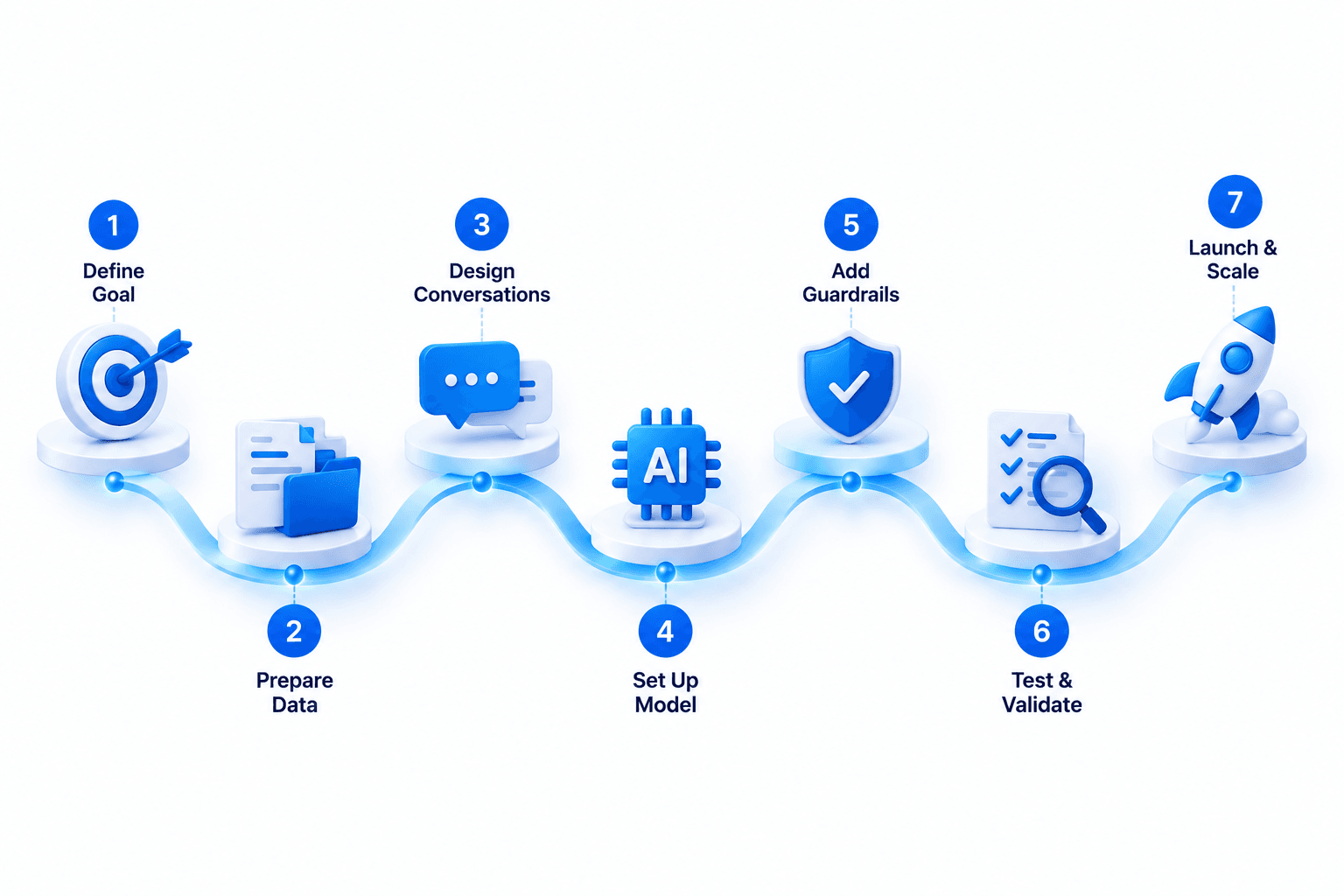
Every serious build follows the same order. Teams that skip steps don’t save time. They pay for it later in rework.
Planning: Get These Right Before Anyone Writes Code
Step 1: Define one job and how you’ll measure it
Pick a single job for version one. “Answer billing questions and resolve most of them without a human” is a job. “Improve customer experience” is not.
The metric matters because it shapes every decision after it. Containment rate, lead capture rate, and average handling time each push the design in a different direction.
Step 2: Audit the data the bot will need
An AI chatbot is only as good as what it can look up. List every source: help articles, product docs, policy PDFs, past support tickets, and CRM fields.
Then check quality, because outdated docs produce confident wrong answers. Here’s what nobody mentions: cleaning the knowledge base often takes longer than building the bot.
Step 3: Map the conversations and the exits
Write out your ten most common conversations from start to finish. Mark where the bot should hand off to a human and what context it passes along.
A handoff that makes the customer repeat everything undoes the whole point. Design the exit before the entry.
Building: Turn the Plan Into a Working System
Step 4: Choose the model and the retrieval setup
Most business chatbots in 2026 run on a large language model such as GPT, Claude, or an open model like Llama. The model handles language. It shouldn’t be the source of facts about your business.
That’s the job of retrieval augmented generation (RAG). Your documents are split into chunks, embedded, and stored in a vector database like Pinecone or pgvector. When a question comes in, the bot pulls the relevant passages and answers from them.
Frameworks such as LangChain or Rasa can speed up this layer. Choose based on your team’s stack and how much control you need over the dialogue, not on popularity.
Step 5: Build guardrails into the conversation
Set clear rules for what the bot won’t answer, what it must cite, and when it escalates. Filter inputs for prompt injection, and check outputs for anything that looks like a price or policy commitment.
For an enterprise AI chatbot, this layer usually includes role-based access. That way, an employee only sees what their permissions allow.
Step 6: Test with real conversations
Build your test set from actual support transcripts, not questions the team makes up. Rerun it every time you change a prompt, a document, or the model version.
Track wrong answers separately from “I don’t know” answers. Wrong answers damage trust. “I don’t know” is fine, as long as the handoff works.
Step 7: Launch narrow, then expand
Release to a slice of traffic or a single channel first, then read the transcripts for two weeks. Real users phrase things in ways no test set predicts.
Add channels like WhatsApp, Slack, or SMS only after the core experience holds up.
CRM Setup: Where Most Chatbot Projects Stall
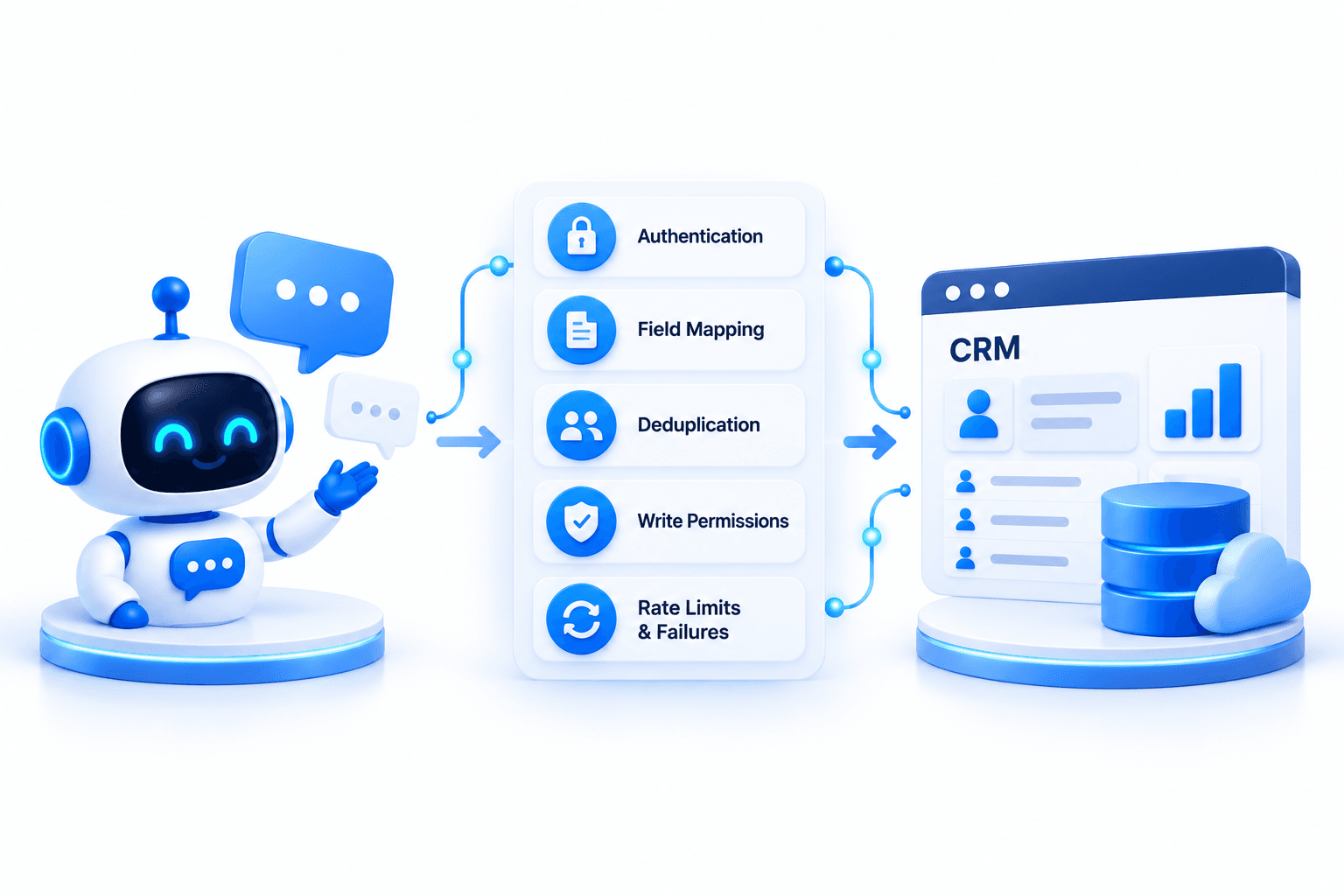
Fair warning: this is the part no-code tutorials wave through with “connect your tools.” In practice, AI chatbot integration with CRM is where projects pick up most of their unplanned work.
A working CRM setup involves five things:
- Authentication - OAuth connections to Salesforce, HubSpot, or Zoho, with token refresh handled so the integration doesn’t quietly stop working a few weeks after launch.
- Field mapping - Deciding which conversation details go into which CRM fields, and what happens when a required field is missing.
- Deduplication - Checking for an existing contact before creating a new one. Skip this, and your sales team inherits a mess within a month.
- Write permissions - Limiting what the bot can change. Reading order status is low risk. Updating deal stages or contact owners usually isn’t.
- Rate limits and failures - CRMs throttle API calls, so the bot needs queuing and retry logic. Otherwise a busy hour drops leads.
We learned the value of scoping this early on a voice-activated clinical assistant we built for a healthcare provider in Australia. It had to integrate with EMR systems and automate prescription workflows with OpenAI, so every write into a clinical record needed tight limits.
A CRM is less sensitive than a medical record, but the principle carries over. Decide what the bot is allowed to write before you connect it.
What It Costs to Build an AI Chatbot in 2026
I know you scrolled here first. So I’ll skip the vague answer and show the math, because a range without the reasoning behind it isn’t much use.
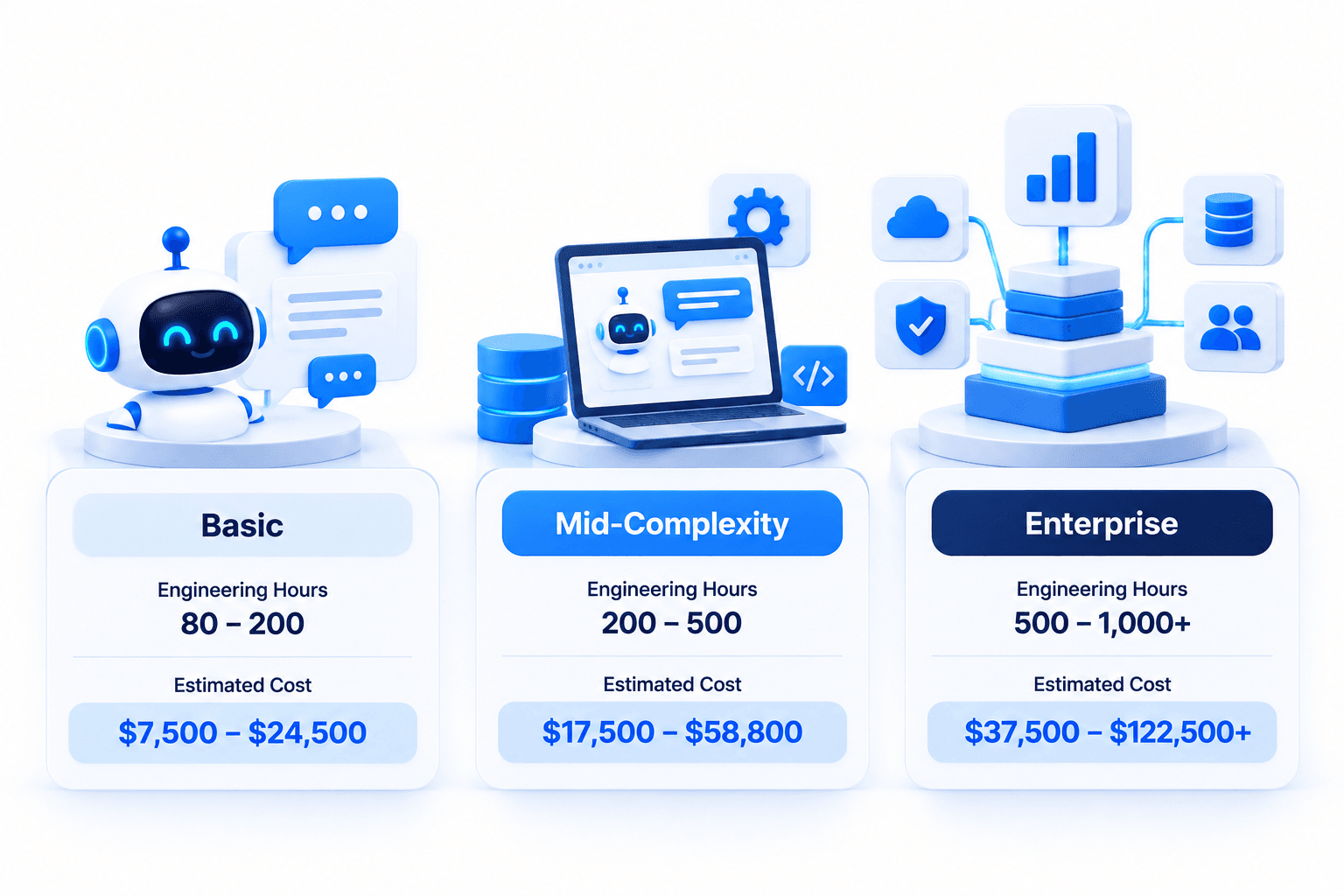
Custom chatbots are priced by engineering hours. The table below shows typical hours for each tier, multiplied by RemoteState’s published rate of $25 to $49 per hour. Treat these as planning estimates, not quotes.
| Tier | What it includes | Estimated hours | Estimated cost |
|---|---|---|---|
| Basic | RAG bot on your docs, one channel, human handoff | 300 to 500 | $7,500 to $24,500 |
| Mid-complexity | Multiple channels, CRM integration, analytics dashboard | 700 to 1,200 | $17,500 to $58,800 |
| Enterprise | SSO, role-based access, compliance controls, several integrations, agent actions | 1,500 to 2,500+ | $37,500 to $122,500+ |
Your AI chatbot development cost moves between tiers mostly because of integrations and compliance, not the AI itself. The model is often the cheapest part of the build.
An enterprise AI chatbot also needs security review, audit logging, and access controls. That’s why hours climb so quickly in the top tier.
India-based engineering vs US-only teams
The same hours from a US-only team typically cost two to three times more. That gap is why RemoteState runs engineering from Noida, with a US office in Santa Monica handling contracts and accountability.
Cheaper hours only help if the team has shipped this kind of system before. A low rate on a team that’s learning RAG on your project is the most expensive option.
The costs that show up after launch
This part rarely comes up in sales calls. Build cost is a one-time number. Running cost lasts as long as the bot does.
- Model usage - LLM providers bill per token, so cost scales with conversation volume and answer length.
- Hosting and vector storage - Small for most bots, but it grows with your document library.
- Knowledge base upkeep - Every product or policy change means a content update, or the bot starts giving outdated answers.
- Monitoring and tuning - Someone has to read transcripts and adjust prompts every month.
When comparing quotes, ask for the projected monthly running cost next to the build price. A cheap build with inefficient prompts can cost more over 18 months than a well-optimized one. That’s the honest way to compare AI chatbot development cost across vendors.
If your bot needs to take actions across several systems, our AI agent development cost guide covers the next tier up.
How We Evaluate a Chatbot Build
Whether we’re scoping a custom chatbot development project or reviewing someone else’s, we score every chatbot on the same four criteria. You can use this list to judge any partner’s proposal.
Answer accuracy on real questions - Accuracy should be measured against a test set built from actual transcripts. If a vendor can’t tell you how they’ll measure it, that tells you something.
Handoff quality - When the bot escalates, does the human agent get the full context? Or does the customer have to start over?
Integration reliability - What happens when the CRM is down, slow, or returns an error? Good builds fail gracefully and retry without losing data.
Cost per resolved conversation - Add the build cost and running cost, then divide by the conversations the bot actually resolves. This is the number that tells you whether it’s working.
Mistakes We See Most Often
The same problems come up across conversational AI projects again and again. None of them are about the model.
- Starting with five use cases - Scope spreads, and nothing gets good. Start with one job.
- Skipping the data cleanup - The bot repeats whatever the docs say, including the parts that stopped being true last year.
- Treating launch as the finish line - The first month of transcripts teaches you more than the whole planning phase.
- Letting the bot write to systems without limits - One bad prompt, and your CRM fills with junk records.
- Choosing a partner on hourly rate alone - Ask what they’ve shipped, and ask to see it working.
How RemoteState Approaches Chatbot Builds
Everything above is the playbook. The harder part is having a team that has already worked through the problems that only appear in production.
Our AI chatbot development work starts with the planning steps above: one defined job, a data audit, and a handoff design before anyone picks a model. Engineering runs from Noida, and our Santa Monica office handles contracts and accountability for US clients.
Proof: a conversational AI platform built on real voices
One of our closest projects to this topic is a conversational AI platform that creates AI avatars of real leaders. Users talk to the avatar, and it responds in the leader’s own cloned voice, powered by context-aware language models.
The hard engineering problem in a project like this isn’t generating an answer. It’s keeping the persona consistent across a long conversation, so the avatar remembers context and sounds like the same person from the first message to the twentieth.
A cloned voice raises the bar further. Any mismatch between what is said and how it sounds breaks the experience immediately.
A team of three built the platform over seven months. It passed 24,000 downloads and reached an 11% revenue conversion rate. Read the full case study.
Your bot probably won’t need a cloned voice. But the same discipline around context, persona, and consistency is what separates a chatbot customers trust from one they avoid.
Frequently Asked Questions
Conclusion
Knowing how to build an AI chatbot is mostly about knowing what to decide first: one job, clean data, a handoff that works, and a CRM setup with limits. The model is the easy part.
If you’re weighing AI chatbot development for your business and want a second opinion on scope or budget, talk to the RemoteState team. We’ll tell you honestly if a no-code tool would do the job.
Next step: Planning something bigger than a chatbot? Our guide to generative AI development cost breaks down the full range of builds.
Most AI chatbot guides end at a no-code builder. This one covers what happens after: custom build steps, real costs, and CRM integrations that hold up in 2026.


